Pixelate an image, or just the part you need to hide
Drop the image into edit.here, press 7 and drag a box over the part you want hidden. Pixelate is the default style, and the image never leaves your device.
Open the editor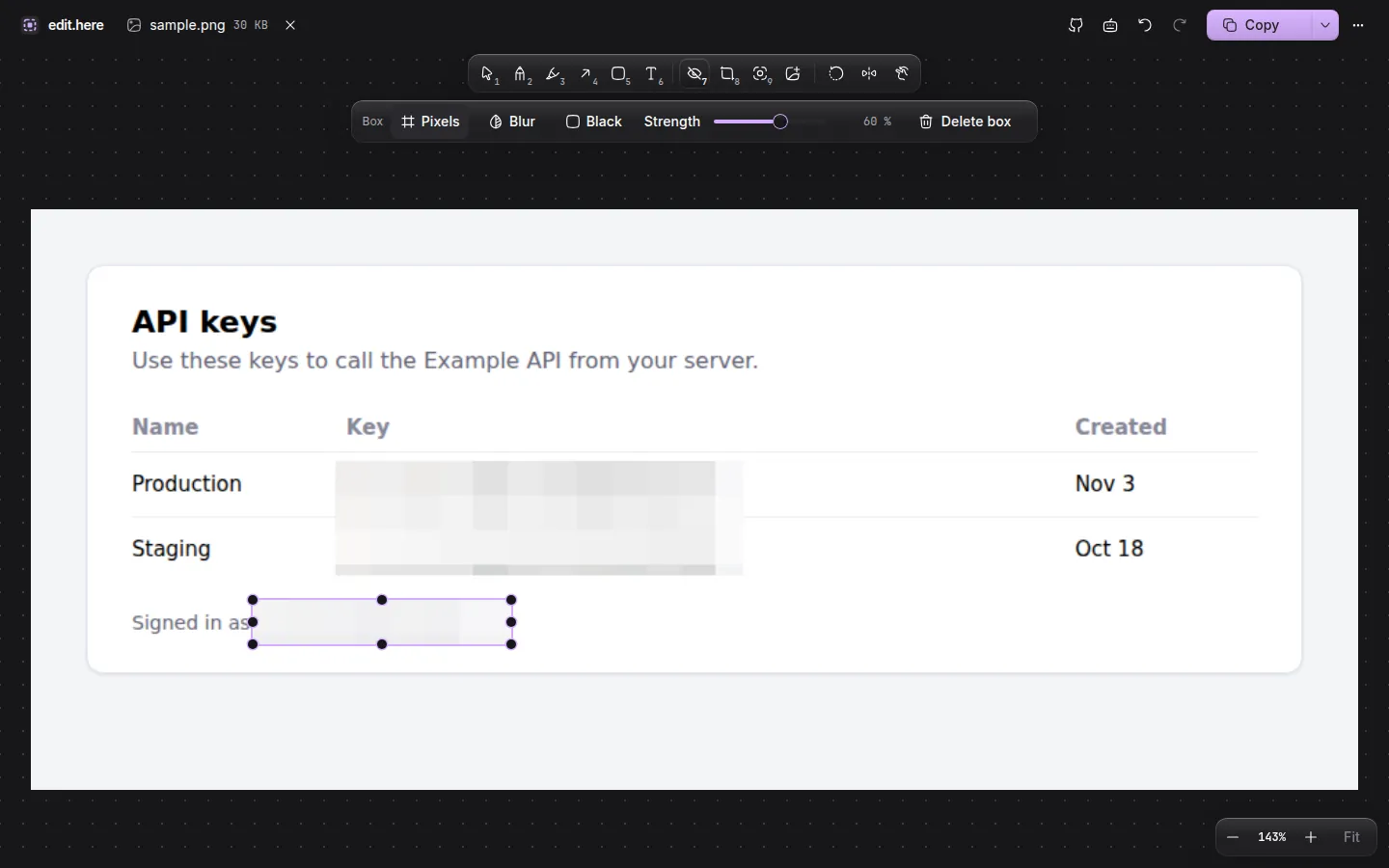
How to pixelate part of an image
- Open the edit.here editor and drop, paste or choose an image. PNG, JPG, WebP, GIF, AVIF and BMP files are accepted.
- Press 7 or R to pick the redact tool. Pixels is already selected.
- Drag across the area to cover. Draw as many boxes as you need: faces, names, email addresses, order numbers.
- Click a box to change it. The Strength slider sets the block size, and you can switch that box to Blur or Black.
- Export with Ctrl+E (Cmd+E on a Mac), which saves a PNG unless you picked another format. To pick JPEG or WebP, open the menu next to the Copy button; formats your browser can't encode are left out. Ctrl+C copies the result instead, in browsers that allow copying images, so you can paste it straight into a chat or an issue.
To pixelate the whole picture, drag one box from corner to corner. Made a mistake? Undo with Ctrl+Z, or select a box and press Delete.
Pixelate, blur or black out: which one should you use?
Use black for anything secret, like passwords, API keys and card numbers, and pixelate or blur for faces and text that only needs to be unreadable at a glance.
| Style | What it does | Good for |
|---|---|---|
| Pixels | Replaces the area with large square blocks of its average color. | Faces, names, license plates, the look people expect from a censored image. |
| Blur | Smears the area so shapes stay but detail goes. | Backgrounds, faces in a crowd, a softer look in a product screenshot. |
| Black | Paints a solid box over the area. Nothing of the original is left. | Passwords, tokens, API keys, account and card numbers. |
Pixelation and blur keep some information about what was underneath. Researchers have shown that short pixelated text in screenshots can be reconstructed, for example with the open-source Depix tool. If exposing the text would matter, black it out. In edit.here the block size grows with the Strength slider and with the image size, so a higher strength leaves less to work with.
Is the image uploaded anywhere?
No. edit.here opens, edits and exports files on your own device, and there is no account. That matters most for the images you pixelate in the first place: screenshots with customer data, internal dashboards and photos of other people.
The editor uses cookieless analytics (Databuddy) for page views, Web Vitals, which tools are used and fixed error codes. It never sends file names, file contents or anything you type, and it does not load when Global Privacy Control or Do Not Track is on. After your first visit the editor also works offline.
What else can you fix before you share it?
The same editor has the other tools you usually need on a screenshot:
- Crop, rotate and flip (8 for crop).
- Arrows, boxes, a pen, a highlighter and text to point at what matters.
- A frame with padding, rounded corners, a shadow and a background.
Press ? in the editor to see every shortcut. It also trims, crops and adjusts videos.
Questions
Is edit.here free?
Yes. It is free, adds no watermark, and the code is MIT-licensed open source on GitHub.
Can I pixelate a photo on my phone?
The editor opens in mobile browsers, but it is built mainly for desktop, where dragging a precise box is easier.
Which image formats can I save?
PNG, JPEG or WebP, as long as your browser can encode the format, or a copy on your clipboard in browsers that allow copying images. Pick the format in the menu next to the Copy button.
Pixelate an image now